# Form

## Form Designer

### Design mode

![](https://3344229214-files.gitbook.io/~/files/v0/b/gitbook-legacy-files/o/assets%2F-LQ0OuyalhD4eRB31PgV%2F-M2Q1ic7O0YcaVRBuGxf%2F-M2Q1mLDphcJLekwBTPJ%2Fform_designer.png?alt=media\&token=bdea2dcd-6a87-4b58-962b-897e081c486a)

### ASP.NET editor

Click the **.NET** icon at the far right of the toolbar to open the ASP.NET code editor, which can be used to define server-side procedures, events, and global variables to handle any specific custom tasks. This feature is mainly intended for ASP.NET developers.

![](https://3344229214-files.gitbook.io/~/files/v0/b/gitbook-legacy-files/o/assets%2F-LQ0OuyalhD4eRB31PgV%2F-M4K_IuNXHdaHZCFosE_%2F-M4K_TPMT8czqzNv9kvV%2Fform-designer-net.png?alt=media\&token=34906809-ae07-4dc0-9787-29b7827486ab)

### AJAX mode

If you're using the form designer, you can enable AJAX mode by checking **Enable AJAX mode** on the **General** tab of the form configuration panel.

If you're using Visual Studio to develop a custom ASPX form in AJAX mode, do the following:

1. In the `<form runat="server">` element, add a `ScriptManager` at the beginning of the form and wrap all the form content in the `contenttemplate` of an `UpdatePanel`.<br>

   **Example:**

   ```markup
    <form id="form1" name="form1" runat="server">
    <asp:scriptmanager id="ScriptManager1" runat="server"></asp:scriptmanager>
    <asp:updatepanel id="UpdatePanel1" runat="server">
    <contenttemplate>
    ... form content ...
    </contenttemplate>
    </asp:updatepanel>
    </form>
   ```
2. Since standard `FileUpload` controls are not supported inside the `UpdatePanel`, use our custom `WorkflowFileUpload` user control for your attachment needs.<br>
3. Add the following line in the page constructor to prevent an issue that can occur when updating a row in a GridView:

   ```
    this.UseClientSideOptimization = false;
   ```

   You will see no difference at runtime, since all this does is prevent a postback when clicking the **Update** button and the validation fails. The `UpdatePanel` already prevents postback.<br>
4. Register the postback triggers either in the `Page_Load` event or directly in the ASPX page.

## Toolbar

### Design mode

|                                                                                                             Icon                                                                                                             | Name                             | Description                                                                                                                                                                                                                                                                                                                                                                                              |
| :--------------------------------------------------------------------------------------------------------------------------------------------------------------------------------------------------------------------------: | -------------------------------- | -------------------------------------------------------------------------------------------------------------------------------------------------------------------------------------------------------------------------------------------------------------------------------------------------------------------------------------------------------------------------------------------------------- |
|    ![](https://3344229214-files.gitbook.io/~/files/v0/b/gitbook-legacy-files/o/assets%2F-LQ0OuyalhD4eRB31PgV%2F-LQ0P-T4HIR4NuuKqbhT%2F-LQ0P3-3RPrpYwixMLRV%2Fformeditor-new-a.png?generation=1540843313425295\&alt=media)    | New form                         | Creates a new form or replaces the current form                                                                                                                                                                                                                                                                                                                                                          |
|    ![](https://3344229214-files.gitbook.io/~/files/v0/b/gitbook-legacy-files/o/assets%2F-LQ0OuyalhD4eRB31PgV%2F-LQ0P-T4HIR4NuuKqbhT%2F-LQ0P3-5Lq1NYpaGan3g%2Fformeditor-save-a.png?generation=1540843312873603\&alt=media)   | Save the form                    | Saves the current form (you can also press **`Ctrl+S`** to save)                                                                                                                                                                                                                                                                                                                                         |
|   ![](https://3344229214-files.gitbook.io/~/files/v0/b/gitbook-legacy-files/o/assets%2F-LQ0OuyalhD4eRB31PgV%2F-LQ0P-T4HIR4NuuKqbhT%2F-LQ0P2zo0PDDFvECZyxR%2Fformeditor-print-a.png?generation=1540843310985739\&alt=media)   | Print the form                   | Prints the current form                                                                                                                                                                                                                                                                                                                                                                                  |
| ![](https://3344229214-files.gitbook.io/~/files/v0/b/gitbook-legacy-files/o/assets%2F-LQ0OuyalhD4eRB31PgV%2F-LQ0P-T4HIR4NuuKqbhT%2F-LQ0P2zqBlba4nuSNpSl%2Fformeditor-save-tool-a.png?generation=1540843313997253\&alt=media) | Save a section or field as tool  | Saves the selected section or field as a custom tool                                                                                                                                                                                                                                                                                                                                                     |
| ![](https://3344229214-files.gitbook.io/~/files/v0/b/gitbook-legacy-files/o/assets%2F-LQ0OuyalhD4eRB31PgV%2F-LQ0P-T4HIR4NuuKqbhT%2F-LQ0P2zs6SIrvAwihEVM%2Fformeditor-duplicate-a.png?generation=1540843312981305\&alt=media) | Duplicate a section or field     | Makes a copy of the selected section or field and inserts it in the form. The duplicate section or field will appear below the selected section or field.                                                                                                                                                                                                                                                |
|    ![](https://3344229214-files.gitbook.io/~/files/v0/b/gitbook-legacy-files/o/assets%2F-LQ0OuyalhD4eRB31PgV%2F-LQ0P-T4HIR4NuuKqbhT%2F-LQ0P2zuTWbFm5bEk4oF%2Fformeditor-del-a.png?generation=1540843315999340\&alt=media)    | Delete a section or field        | Deletes the selected section or field from the form                                                                                                                                                                                                                                                                                                                                                      |
|    ![](https://3344229214-files.gitbook.io/~/files/v0/b/gitbook-legacy-files/o/assets%2F-LQ0OuyalhD4eRB31PgV%2F-LQ0P-T4HIR4NuuKqbhT%2F-LQ0P2zwq97mXU8SxTkD%2Fformeditor-conf-a.png?generation=1540843320564142\&alt=media)   | Form configuration               | Opens the **Form configuration** window                                                                                                                                                                                                                                                                                                                                                                  |
|       ![](https://3344229214-files.gitbook.io/~/files/v0/b/gitbook-legacy-files/o/assets%2F-LQ0OuyalhD4eRB31PgV%2F-LQ0P-T4HIR4NuuKqbhT%2F-LQ0P2zyEQMn9cZiX0h9%2Fworkflow-a.png?generation=1540843313449491\&alt=media)       | Workflow view                    | Displays the interactive workflow view                                                                                                                                                                                                                                                                                                                                                                   |
|          ![](https://3344229214-files.gitbook.io/~/files/v0/b/gitbook-legacy-files/o/assets%2F-LQ0OuyalhD4eRB31PgV%2F-LQ0P-T4HIR4NuuKqbhT%2F-LQ0P3--TJMy1qJuCVvP%2Fundo.png?generation=1540843310306205\&alt=media)          | Undo/redo                        | Undoes or redoes the most recent changes made to the form                                                                                                                                                                                                                                                                                                                                                |
|                                                                                                          **Styles**                                                                                                          | Select a style                   | List of default and custom styles; select an item to change the style of the current form.                                                                                                                                                                                                                                                                                                               |
|                                                                                                           **Tools**                                                                                                          | Select a tool                    | List of default and custom tools; select an item in order to add the tool to the form using the Insert button.                                                                                                                                                                                                                                                                                           |
|         ![](https://3344229214-files.gitbook.io/~/files/v0/b/gitbook-legacy-files/o/assets%2F-LQ0OuyalhD4eRB31PgV%2F-LQ0P-T4HIR4NuuKqbhT%2F-LQ0P3-1en-BG9NgEavu%2Fplus-s.png?generation=1540843309648113\&alt=media)         | Insert the selected tool         | Inserts the selected tool in the form                                                                                                                                                                                                                                                                                                                                                                    |
|                                                                                                            **Id**                                                                                                            | Edit ID                          | Edit section and field identifiers                                                                                                                                                                                                                                                                                                                                                                       |
|                                                                                                          **Tooltip**                                                                                                         | Edit tooltip                     | Edit section and field tooltips                                                                                                                                                                                                                                                                                                                                                                          |
|                                                                                                          **Format**                                                                                                          | Edit format                      | Edit section and field format                                                                                                                                                                                                                                                                                                                                                                            |
|                                                                                                        **Appearance**                                                                                                        | Edit appearance                  | Edit the appearance of headers, footers, labels, sections, and fields (see [Appearance](https://docs.advantys.com/workflowgen-administration-module-reference-guide/7.12.0-8/form-appearance-behavior-and-mapping#appearance))                                                                                                                                                                           |
|                                                                                                         **Behavior**                                                                                                         | Edit field and section behavior  | Displays the interactive view of the workflow, activates the **Required**, **Read-only**, and **Hidden** clickable options for each form field, and sets the behavior of sections and form fields for each action (see [Field & section behavior](https://docs.advantys.com/workflowgen-administration-module-reference-guide/7.12.0-8/form-appearance-behavior-and-mapping#field-and-section-behavior)) |
|                                                                                                          **Mapping**                                                                                                         | Edit field’s action data mapping | Displays the interactive view of the workflow, activates clickable options **Retrieve the value** and **Send the value** for each form field and defines the data input and output for each action (see [Field data mapping](https://docs.advantys.com/workflowgen-administration-module-reference-guide/7.12.0-8/form-appearance-behavior-and-mapping#field-data-mapping))                              |
|                                                                                                           **.NET**                                                                                                           | ASP.NET                          | Switch to the ASP.NET code editor                                                                                                                                                                                                                                                                                                                                                                        |

### ASP.NET editor

|                                                                                                            Icon                                                                                                            | Name              | Description                                      |
| :------------------------------------------------------------------------------------------------------------------------------------------------------------------------------------------------------------------------: | ----------------- | ------------------------------------------------ |
|   ![](https://3344229214-files.gitbook.io/~/files/v0/b/gitbook-legacy-files/o/assets%2F-LQ0OuyalhD4eRB31PgV%2F-LQ0P-T4HIR4NuuKqbhT%2F-LQ0P3-3RPrpYwixMLRV%2Fformeditor-new-a.png?generation=1540843313425295\&alt=media)   | New               | Clears the ASP.NET code                          |
|   ![](https://3344229214-files.gitbook.io/~/files/v0/b/gitbook-legacy-files/o/assets%2F-LQ0OuyalhD4eRB31PgV%2F-LQ0P-T4HIR4NuuKqbhT%2F-LQ0P3-5Lq1NYpaGan3g%2Fformeditor-save-a.png?generation=1540843312873603\&alt=media)  | Save              | Saves the ASP.NET code                           |
| ![](https://3344229214-files.gitbook.io/~/files/v0/b/gitbook-legacy-files/o/assets%2F-LQ0OuyalhD4eRB31PgV%2F-LQ0P-T4HIR4NuuKqbhT%2F-LQ0P3-74mzuc2mPpS2b%2Fformeditor-comment-a.png?generation=1540843311506514\&alt=media) | Comment/Uncomment | Adds or removes `//` before the selected line(s) |
|                                                                                                         **Design**                                                                                                         | Form Designer     | Switch to the Form Designer                      |

## Form configuration

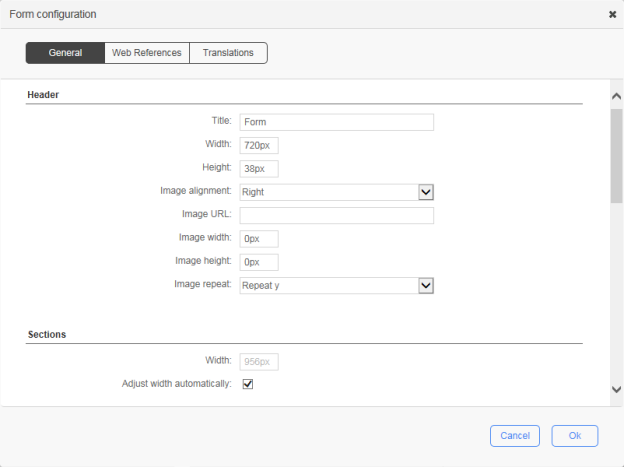
A form created with the built-in form designer has one header, one or several sections, one or several fields per section, a **Submit** button, an optional **Save as a draft** button, and one footer.

<div align="left"><img src="https://3344229214-files.gitbook.io/~/files/v0/b/gitbook-legacy-files/o/assets%2F-LQ0OuyalhD4eRB31PgV%2F-LQ0P-T4HIR4NuuKqbhT%2F-LQ0P3-9glhopT2SUwuZ%2Fform_configuration_624x467.png?generation=1540843309142692&#x26;alt=media" alt=""></div>

<div align="left"><img src="https://3344229214-files.gitbook.io/~/files/v0/b/gitbook-legacy-files/o/assets%2F-LQ0OuyalhD4eRB31PgV%2F-LQ0P-T4HIR4NuuKqbhT%2F-LQ0P3-BOwVPX5GnrbfZ%2Fform_configuration_web_references_624x467.png?generation=1540843313529331&#x26;alt=media" alt=""></div>

### General tab

| Name                                              | Description                                                                                                                                                                                                                                                                                                                                                                                                                                                              |
| ------------------------------------------------- | ------------------------------------------------------------------------------------------------------------------------------------------------------------------------------------------------------------------------------------------------------------------------------------------------------------------------------------------------------------------------------------------------------------------------------------------------------------------------ |
| **Header**                                        |                                                                                                                                                                                                                                                                                                                                                                                                                                                                          |
| Title                                             | The title of the form                                                                                                                                                                                                                                                                                                                                                                                                                                                    |
| Width                                             | <p>The width of the form header</p><p></p><p>Numeric value with or without the unit of measure (<code>px</code>, <code>pt</code>, <code>in</code>, <code>cm</code>, <code>mm</code>, <code>pc</code>, <code>em</code>, <code>ex</code>, <code>%</code>), e.g. <code>720px</code></p>                                                                                                                                                                                     |
| Height                                            | <p>The height of the form header</p><p></p><p>Numeric value with or without the unit of measure (<code>px</code>, <code>pt</code>, <code>in</code>, <code>cm</code>, <code>mm</code>, <code>pc</code>, <code>em</code>, <code>ex</code>, <code>%</code>), e.g. <code>38px</code></p>                                                                                                                                                                                     |
| Image alignment                                   | <p>The alignment for the header image:</p><ul><li><strong>Right</strong>: The image will be aligned to the right.</li><li><strong>Left</strong>: The image will be aligned to the left.</li><li><strong>None</strong>: No alignment.</li></ul>                                                                                                                                                                                                                           |
| Image URL                                         | The URL of the image to be shown                                                                                                                                                                                                                                                                                                                                                                                                                                         |
| Image width                                       | The width of the image                                                                                                                                                                                                                                                                                                                                                                                                                                                   |
| Image height                                      | The height of the image                                                                                                                                                                                                                                                                                                                                                                                                                                                  |
| Image repeat                                      | <p>Sets if and how the image will be repeated:</p><ul><li><strong>No-repeat</strong>: the image will not be repeated</li><li><strong>Repeat</strong>: the image will be repeated both vertically and horizontally (this is the default setting)</li><li><strong>Repeat x</strong>: the image will be repeated only horizontally</li><li><strong>Repeat y</strong>: the image will be repeated only vertically</li></ul>                                                  |
| **Sections**                                      |                                                                                                                                                                                                                                                                                                                                                                                                                                                                          |
| Width                                             | <p>The width for all sections</p><p></p><p>Numeric value with or without the unit of measure (<code>px</code>, <code>pt</code>, <code>in</code>, <code>cm</code>, <code>mm</code>, <code>pc</code>, <code>em</code>, <code>ex</code>, <code>%</code>), e.g. <code>720px</code></p>                                                                                                                                                                                       |
| Adjust width automatically                        | Check to apply adjusted width to all sections                                                                                                                                                                                                                                                                                                                                                                                                                            |
| **Labels**                                        |                                                                                                                                                                                                                                                                                                                                                                                                                                                                          |
| Alignment                                         | <p>The alignment for all field labels:</p><ul><li><strong>Right</strong>: the label will be aligned to the right of the field</li><li><strong>Left</strong>: the label will be aligned to the left of the field</li><li><strong>Top</strong>: the label will be aligned on top of the field</li></ul>                                                                                                                                                                    |
| Width                                             | <p>The width for all field labels</p><p></p><p>Numeric value with or without the unit of measure (<code>px</code>, <code>pt</code>, <code>in</code>, <code>cm</code>, <code>mm</code>, <code>pc</code>, <code>em</code>, <code>ex</code>, <code>%</code>), e.g. <code>150px</code></p>                                                                                                                                                                                   |
| Apply the width                                   | Check to apply the width to all field labels                                                                                                                                                                                                                                                                                                                                                                                                                             |
| **Buttons**                                       |                                                                                                                                                                                                                                                                                                                                                                                                                                                                          |
| Submit label                                      | The label for the submit button                                                                                                                                                                                                                                                                                                                                                                                                                                          |
| Save-as-draft label                               | The label for the save as draft button                                                                                                                                                                                                                                                                                                                                                                                                                                   |
| Enable save-as-draft                              | Check to enable and display the save as draft button                                                                                                                                                                                                                                                                                                                                                                                                                     |
| **Footer**                                        |                                                                                                                                                                                                                                                                                                                                                                                                                                                                          |
| Width                                             | <p>The width of the form footer</p><p></p><p>Numeric value with or without the unit of measure (<code>px</code>, <code>pt</code>, <code>in</code>, <code>cm</code>, <code>mm</code>, <code>pc</code>, <code>em</code>, <code>ex</code>, <code>%</code>), e.g. <code>720px</code></p>                                                                                                                                                                                     |
| Height                                            | <p>The height of the form header</p><p></p><p>Numeric value with or without the unit of measure (<code>px</code>, <code>pt</code>, <code>in</code>, <code>cm</code>, <code>mm</code>, <code>pc</code>, <code>em</code>, <code>ex</code>, <code>%</code>), e.g. <code>22px</code></p>                                                                                                                                                                                     |
| Image alignment                                   | <p>The alignment for the footer image:</p><ul><li><strong>Right</strong>: the image will be aligned to the right side</li><li><strong>Left</strong>: the image will be aligned to the left side</li><li><strong>None</strong>: no alignment</li></ul>                                                                                                                                                                                                                    |
| Image URL                                         | The URL of the image to be shown                                                                                                                                                                                                                                                                                                                                                                                                                                         |
| Image width                                       | The width of the image                                                                                                                                                                                                                                                                                                                                                                                                                                                   |
| Image height                                      | The height of the image                                                                                                                                                                                                                                                                                                                                                                                                                                                  |
| Image repeat                                      | <p>Sets if and how the image will be repeated:</p><ul><li><strong>No repeat</strong>: the image will not be repeated</li><li><strong>Repeat</strong>: the image will be repeated both vertically and horizontally (this is the default setting)</li><li><strong>Repeat-x</strong>: the image will be repeated only horizontally</li><li><strong>Repeat-y</strong>: the image will be repeated only vertically</li></ul>                                                  |
| **Security**                                      |                                                                                                                                                                                                                                                                                                                                                                                                                                                                          |
| Enable XML Signature                              | <p>Check to enable the use of XML signature in the form data</p><p></p><p>Digital signatures are used to certify that a document has not been modified by the system or by someone who gained unauthorized access to the system. The XML signature is a W3C standard that defines the syntax and processing rules for creating and representing digital signatures. This is a method of associating a key with referenced data to insure the integrity of this data.</p> |
| **Misc.**                                         |                                                                                                                                                                                                                                                                                                                                                                                                                                                                          |
| Display a confirmation message for quick deletion | Check to prompt a confirmation message prior to deletion                                                                                                                                                                                                                                                                                                                                                                                                                 |
| Enable AJAX mode                                  | Enable AJAX mode                                                                                                                                                                                                                                                                                                                                                                                                                                                         |

### Web references tab

| **Name**                                   | Description                                                                                                                                                                                                                                                                                                                                                                                                                                                                                                                                                                                                                                                                                                                                                                                                                                                                                                                                                                                                                                                                                                                                                                                                                                             |
| ------------------------------------------ | ------------------------------------------------------------------------------------------------------------------------------------------------------------------------------------------------------------------------------------------------------------------------------------------------------------------------------------------------------------------------------------------------------------------------------------------------------------------------------------------------------------------------------------------------------------------------------------------------------------------------------------------------------------------------------------------------------------------------------------------------------------------------------------------------------------------------------------------------------------------------------------------------------------------------------------------------------------------------------------------------------------------------------------------------------------------------------------------------------------------------------------------------------------------------------------------------------------------------------------------------------- |
| Include jQuery API and jQuery UI libraries | Check to include the jQuery API (v 1.7.2) and jQuery UI (v 1.8.20) libraries in the run-time mode (execution of the form); by default, these libraries are available in design mode                                                                                                                                                                                                                                                                                                                                                                                                                                                                                                                                                                                                                                                                                                                                                                                                                                                                                                                                                                                                                                                                     |
| Free text                                  | <p>Custom web references to be included in the HTML head that will be available in both design and run-time modes. Only <code>\<script></code>, <code>\<meta></code>, <code>\<link></code>, and <code>\<style></code> tags are supported. When you enter a tag, the free text editor automatically inserts its closing tag.</p><p></p><p><strong>Example:</strong></p><p><code>\<link rel="stylesheet" type="text/css" href="mystyle.css" /></code></p><p><code>\<style type="text/css"></code></p><p><code>body {background-color:yellow}</code></p><p><code>p {color:blue}</code></p><p><code>\</style></code></p><p><code>\<meta name="description" content="my content" /></code></p><p><code>\<script type="text/javascript"></code></p><p><code>alert("Hello World!");</code></p><p><code>\</script></code></p><p><code>\<script type="text/javascript" src="myscript.js"></code></p><p><code>\</script></code></p><p><br>To fold a code block, click the down arrow next to the line number, which will insert a double-arrow icon in place of the code. To unfold the code block, click the right arrow. <br><br>Press <strong><code>Ctrl+Space</code></strong>to display a drop-down menu that lists the available variables and keywords.</p> |

### Translations tab

| Name              | Description                                                                                                                                                                                                                                                                                                                                                                                                                                                                                                                                                                                                                                                        |
| ----------------- | ------------------------------------------------------------------------------------------------------------------------------------------------------------------------------------------------------------------------------------------------------------------------------------------------------------------------------------------------------------------------------------------------------------------------------------------------------------------------------------------------------------------------------------------------------------------------------------------------------------------------------------------------------------------ |
| Select a language | <p>The Form Designer allows you to translate form labels and error messages to the languages available in WorkflowGen. Select a language for translation from the languages available in the drop-down list.</p><p></p><p><strong>Note:</strong> Generic language selections such as English, French, Spanish, etc., correspond to the version of the language that the administrator initially used to create a form. For example, if the administrator used <strong>English (United States)</strong> to create a form, then in this instance the selections <strong>English (United States)</strong> and <strong>English</strong> would be one and the same.</p> |
| Free text         | Write translated text that corresponds to the selected language. If a field is left empty, then the language will defer in the following order: **Country-specific language > Generic language > Default language**.                                                                                                                                                                                                                                                                                                                                                                                                                                               |