> For the complete documentation index, see [llms.txt](https://docs.advantys.com/workflowgen-administration-module-reference-guide/llms.txt). Markdown versions of documentation pages are available by appending `.md` to page URLs; this page is available as [Markdown](https://docs.advantys.com/workflowgen-administration-module-reference-guide/8.3-4/docusigncheck-workflow-application.md).

# DOCUSIGNCHECK Workflow Application

## Overview

The **DOCUSIGNCHECK** workflow application lets you check the status of an envelope and download its associated file, which is a concatenation of attached files.

## How it works

* You can check the status of an envelope and download the file from DocuSign according to your status criteria.<br>
* Application logs are available. These can be specified by setting the value of the `DocuSignCheckLogLevel` parameter in the `web.config` file to `0` to deactivate logs, `1` for error logs, `2` for information logs, or `3` for debug logs; the default value is `0`.

## Required parameter

| **Parameter**          | **Type** | **Direction** | **Description**               |
| ---------------------- | -------- | ------------- | ----------------------------- |
| `DOCUSIGN_ENVELOPE_ID` | TEXT     | IN            | DocuSign envelope ID to check |

## Optional parameters

### DocuSign configuration

There are two ways to configure DocuSign account information: you can define the configuration in the `web.config` file or in the Configuration Panel, or you can manage the configuration on each DOCUSIGNCHECK action.

{% hint style="info" %}
These parameters must be associated to a DocuSign account.
{% endhint %}

{% hint style="warning" %}
It's necessary to have authorized your DocuSign application for use. To do this, go to the following address: `<SERVER>/oauth/auth?response_type=code&scope=signature%20impersonation&client_id=<CLIENT_ID>&redirect_uri=<REDIRECT_URI>`

* `<SERVER>`: `https://account.docusign.com` (production) or`https://account-d.docusign.com` (demo)
* `<CLIENT_ID>`: Corresponds to your DocuSign application's `Integration Key` value
* `<REDIRECT_URI>`: Redirect address (e.g.  `https://docusign.com`)
  {% endhint %}

| **Parameters**         | **Type** | **Direction** | **Description**                                                                                                                                                                                                                                                                                           |
| ---------------------- | -------- | ------------- | --------------------------------------------------------------------------------------------------------------------------------------------------------------------------------------------------------------------------------------------------------------------------------------------------------- |
| `DOCUSIGN_CLIENT_ID`   | TEXT     | IN            | <p>DocuSign client ID<br><br>Corresponds to your DocuSign application's <code>Integration Key</code> value</p><p></p><p>By default, this value comes from the <code>DocuSignClientId</code> parameter in the <code>web.config</code>.</p>                                                                 |
| `DOCUSIGN_USER_GUID`   | TEXT     | IN            | <p>DocuSign user GUID<br><br>Corresponds to the value of <code>User ID</code> in the DocuSign configuration panel</p><p></p><p>By default, this value comes from the <code>DocuSignUserGuid</code> parameter in the <code>web.config</code>.</p>                                                          |
| `DOCUSIGN_AUTH_SERVER` | TEXT     | IN            | <p>DocuSign Auth server</p><p></p><p>DocuSign values:</p><ul><li><code>account.docusign.com</code> (production)</li><li><code>account-d.docusign.com</code> (demo)</li></ul><p>By default, this value comes from the <code>DocuSignAuthServer</code> parameter in the <code>web.config</code>.</p>        |
| `DOCUSIGN_RSA_KEY`     | TEXT     | IN            | <p>DocuSign RSA key<br><br>By default, this value come from the <code>/Files/DocuSign/rsaKey.pem</code> file.</p>                                                                                                                                                                                         |
| `DOCUSIGN_HOST_SERVER` | TEXT     | IN            | <p>DocuSign host server</p><p></p><p>DocuSign values:</p><ul><li><code><https://docusign.net></code> (production)</li><li><code><https://demo.docusign.net></code> (demo)</li></ul><p>By default, this value comes from the <code>DocuSignHostServer</code> parameter in the <code>web.config</code>.</p> |

### General

| **Parameters**      | **Type** | **Direction** | **Description**                                                                                                         |
| ------------------- | -------- | ------------- | ----------------------------------------------------------------------------------------------------------------------- |
| `VALID_STATUS_LIST` | TEXT     | IN            | <p>Valid status to download the document<br><strong>Default:</strong> <code>signed,completed,voided,declined</code></p> |
| `DOCUSIGN_DOCUMENT` | FILE     | OUT           | DocuSign document                                                                                                       |
| `DOCUSIGN_STATUS`   | TEXT     | OUT           | Envelope status                                                                                                         |

## Example with DOCUSIGNSEND

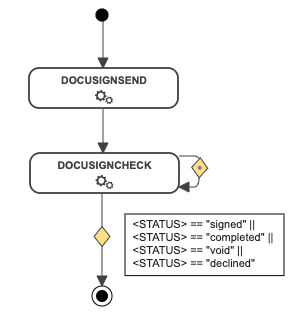
In the following example, the [DOCUSIGNSEND](/workflowgen-administration-module-reference-guide/8.3-4/docusignsend-workflow-application.md) action is directly followed by the DOCUSIGNCHECK action. This action will loop back on itself until the status changes to `signed`, `completed`, `voided`, or `declined`.

If the status returned meets the condition, the document will be downloaded from DocuSign.

<div align="center"><img src="https://content.gitbook.com/content/ifwJ9X94VJGndKIGZ9Qn/blobs/8zc4KBiMv3bPW3pMEHdo/docusigncheck_workflow.png" alt=""></div>

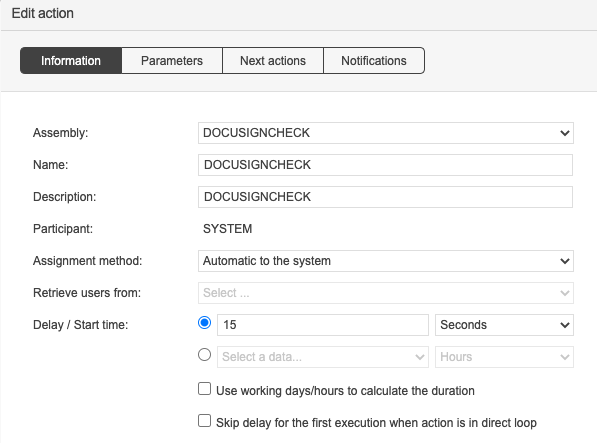
With the system loop action feature, the DOCUSIGNCHECK action will be executed every `x` seconds until the OUT condition is met.
<div align="center"><img src="https://content.gitbook.com/content/ifwJ9X94VJGndKIGZ9Qn/blobs/gqTj8SpYUlUGb1Znfi20/image.png" alt="Configuration of a DOCUSIGNCHECK action"></div>
